
RESOLUME PLUGIN / Audio
Audio Gateway
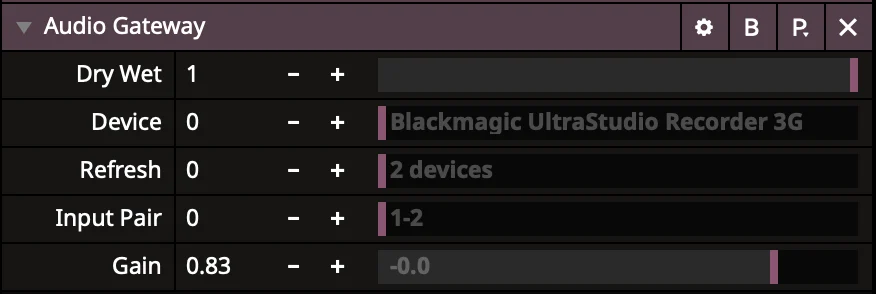
Bring audio from an external device into Resolume. Select an input pair and adjust the signal level.
macOS · Apple Silicon · Arena 7.23
Download plugin
macOS ↓ 0.1 MBZIP archive containing the build for your platform and the available supporting materials.
User guide
Audio Gateway 0.1.7
macOS / Apple Silicon / Resolume Arena 7.23
CONTENTS
- Audio Gateway.vst — the plugin.
- Silent Carrier 48k Stereo.wav — a silent stereo carrier clip.
INSTALLATION
1. Copy Audio Gateway.vst to your VST plugin directory, for example:
Documents/Resolume Arena/VST Plugins
2. Add that folder in Arena: Preferences → Audio → VST Plugin Directories.
3. Restart Arena completely.
USAGE
1. Import Silent Carrier 48k Stereo.wav and enable Loop.
2. Add Audio Gateway from Effects → Audio Effects to this clip.
3. Click Refresh, select Device and Input Pair.
4. Set Dry/Wet = 1 and adjust Gain.
5. The recommended project sample rate is 48000 Hz.
NOTE
If selecting audio from a capture card stops its video even in QuickTime,
this is a limitation of the card or its driver. Use a separate audio interface.